


Posts in Privacy is a right, learn how to protect it

Stirling PDF: l’alternativa open source ad Adobe Acrobat che gira sul tuo PC, guida all’installazione con Docker o app desktop

Stirling PDF: l’alternativa open source ad Adobe Acrobat che gira sul tuo PC, guida all’installazione con Docker o app desktop

1 min read

"Stirling PDF: The open-source alternative to Adobe Acrobat that runs on your PC—a guide to installing it with Docker or the desktop app"

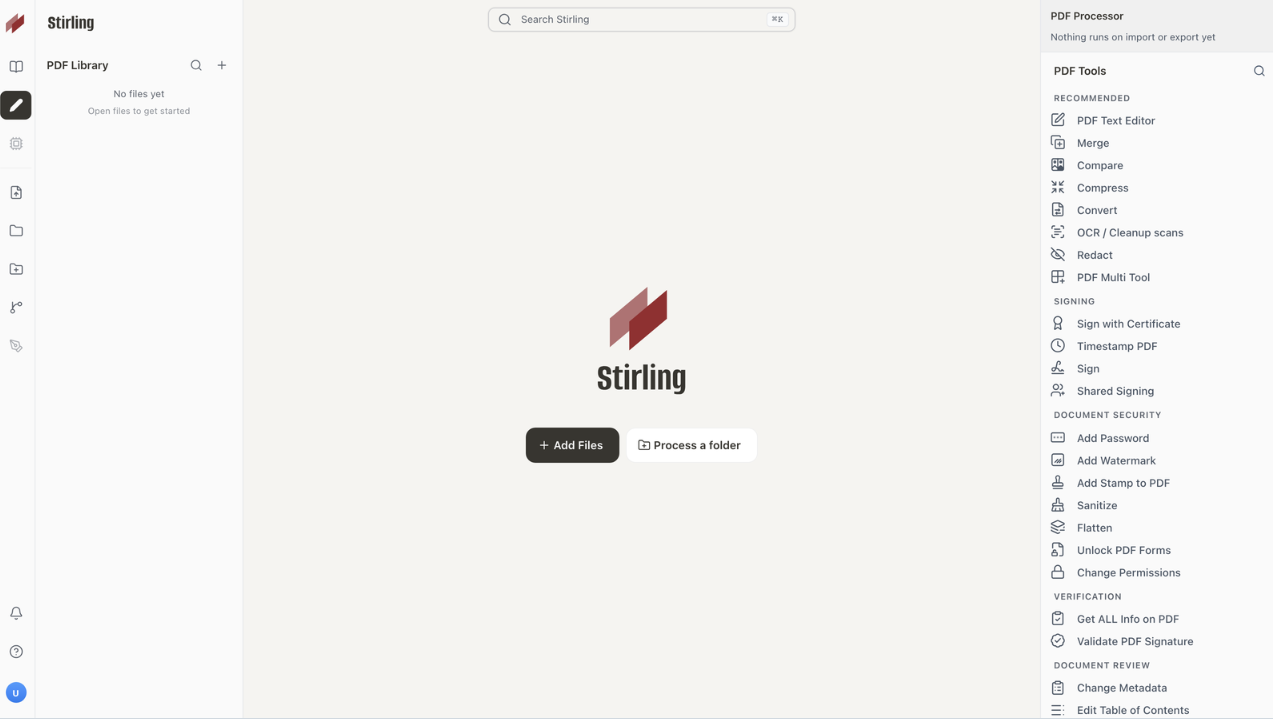
Wrote a full article on this great tool (installed and tested on my PC with Docker) its a real alternative to Adobe Acrobat full of tools and (if you need) works with API or AI.

Useful links
Github Repo

Official Documentation

Full article (Italian)

stirling
Docker: cos’è, perché se ne parla così spesso, e come usarlo in pratica

Docker: cos’è, perché se ne parla così spesso, e come usarlo in pratica

2 min read

"Docker: What It Is, Why It’s Talked About So Often, and How to Use It in Practice"

If you’ve been following TivuStream’s guides for a while, you may have noticed that Docker is often mentioned when discussing “local, no cloud,” etc., as in the guides on Vaultwarden, Immich, Jellyfin, and even in a brief mention in the SearXNG guide. It’s not fair to assume that everyone knows what Docker is and how to use it, which is why this article serves as a simple, hands-on guide to understanding this “mysterious software” and getting started with it.

Docker was originally created as a tool for developers—a local, “containerized” environment where developers of apps, software, or web tools can test their creations live, safely, and without risk until the product is ready for public release.

Thanks to its basic simplicity, Docker can be used by anyone who cares about privacy and the protection of their data; in fact, it’s useful for running the same apps or web apps on your PC so they don’t have to communicate with the outside world—and consequently, don’t have to send data over a remote connection. Examples include: testing or using software before installing it on your PC, running a self-hosted service locally, a password manager, a media server, an automatic photo backup, or even just a small converter like Converter NOW.

In this article, we’ll explore what Docker is, why it’s worth using, what your PC needs to run it, how to install it on different operating systems, and finally, how to use it in practice with essential commands.

Full Article (Italian)

Docker
TivuStream Profile Builder

TivuStream Profile Builder

1 min read

If you are using Betterbird or Thunderbird, from now there is a small (portable) tool to create one or more profiles starting from a single one. It is totally free, works locally and doesn't touch your default profile.

A local Windows tool that analyzes a Betterbird/Thunderbird profile and builds a new,
clean profile containing only the accounts you choose — without retyping accounts and,
where possible, without retyping passwords.

It is not a "profile copier". It is a "profile builder".

  • Local-first: no uploads, no servers, no accounts, no network code.
  • Privacy-first: credentials are never decrypted; reports and logs mask email addresses.
  • Selective: you choose which accounts go into which profile.
  • Non-destructive: the source profile is only read, never modified (enforced in code, see docs/security.md)
  • Italiano / English, light and dark theme.

It is Open source and all specifications (English) are here

TivuStream Profile Builder or on its own hero page (swith to English)

or read full Article (Italian)

switch accounts
Come ricostruire un profilo Thunderbird o Betterbird senza reinserire account e password

Come ricostruire un profilo Thunderbird o Betterbird senza reinserire account e password

1 min read

email client

A complete guide to how rebuild a new Betterbird or Thunderbird profile to run in a fresh Client session without loose email account and insert passwords again

After a few months—or sometimes years—of use, an email client ends up with all sorts of things: extensions you’ve tried and forgotten, settings changed for reasons no one can remember anymore, huge caches, remnants of old configurations, and traces of old accounts you’ve deleted. At some point, Thunderbird or Betterbird starts to slow down or behave strangely, and you need to start from scratch.

The problem is that starting from scratch—especially when you have many accounts—is a nightmare: you have to re-enter server details, ports, sending settings, and retrieve passwords one by one. The situation that inspired this guide involved more than ten accounts, including Gmail, a private provider, an Outlook account, and email addresses from various websites. Setting them up manually would have taken half a day.

read full article (Italian)

TivuStream Privacy Intelligence Engine (PIE)

TivuStream Privacy Intelligence Engine (PIE)

1 min read

Hello to everyone !

I'm working on a new tool to be inserted in TivuStream Privacy Suite as title it is named TivuStream Privacy Intelligence Engine (PIE) born to help people to understand and check own home net connections.

The goal is not to develop a new DNS server or replace existing software, but to build an engine capable of collecting information from various sources, analyzing it, and transforming it into data that is understandable, useful, and immediately accessible to the user.

The first official module developed on top of the Privacy Intelligence Engine will be Network Privacy, checking:

DNS security

network privacy

trackers

malware

devices

DNS activity

configuration

tips

Differently from the other similar tools it explain what it does but, above all, what it doesn't. Most of similar tools are showing loads of numbers or statistics but any of those explain their meaning.

TivuStream PIE has its Github repo so, in case, if someone have to comment or propone more ideas would be very appreciate.

I want to be honest I'm not a professional coder but I'm full of ideas and for this project I'm asking help to Claude code, would be nice to share contents with someone interested.
Thank You !

Github Repo

YouTube senza Google: guida a Invidious, Piped e LibreTube per guardare video senza tracciamento

YouTube senza Google: guida a Invidious, Piped e LibreTube per guardare video senza tracciamento

1 min read

An article how to watch YouTube videos without to be tracked. Simple and free 3 ways to get started on a PC or a mobile device. Invidious, Piped e LibreTube Open source and totally Free.

Ogni volta che apri YouTube da browser o app ufficiale, Google raccoglie una quantità enorme di informazioni: cosa guardi, per quanto tempo, quando ti fermi, cosa cerchi, persino i movimenti del mouse in alcuni test. Tutto questo alimenta un profilo pubblicitario che ti segue anche fuori da YouTube, su Gmail, sulla ricerca, su Chrome. Esistono però alternative concrete, aperte e mantenute dalla comunità, che permettono di guardare gli stessi video senza passare dai server di tracciamento di Google. In questa guida vediamo come funzionano Invidious, Piped e LibreTube, e come iniziare a usarli davvero, sia su PC che su Android.

Full Article (Italian)

No google 

Feel free to comment or suggest advices or ideas

Relevance instead of advertising.

Relevance instead of advertising.

1 min read


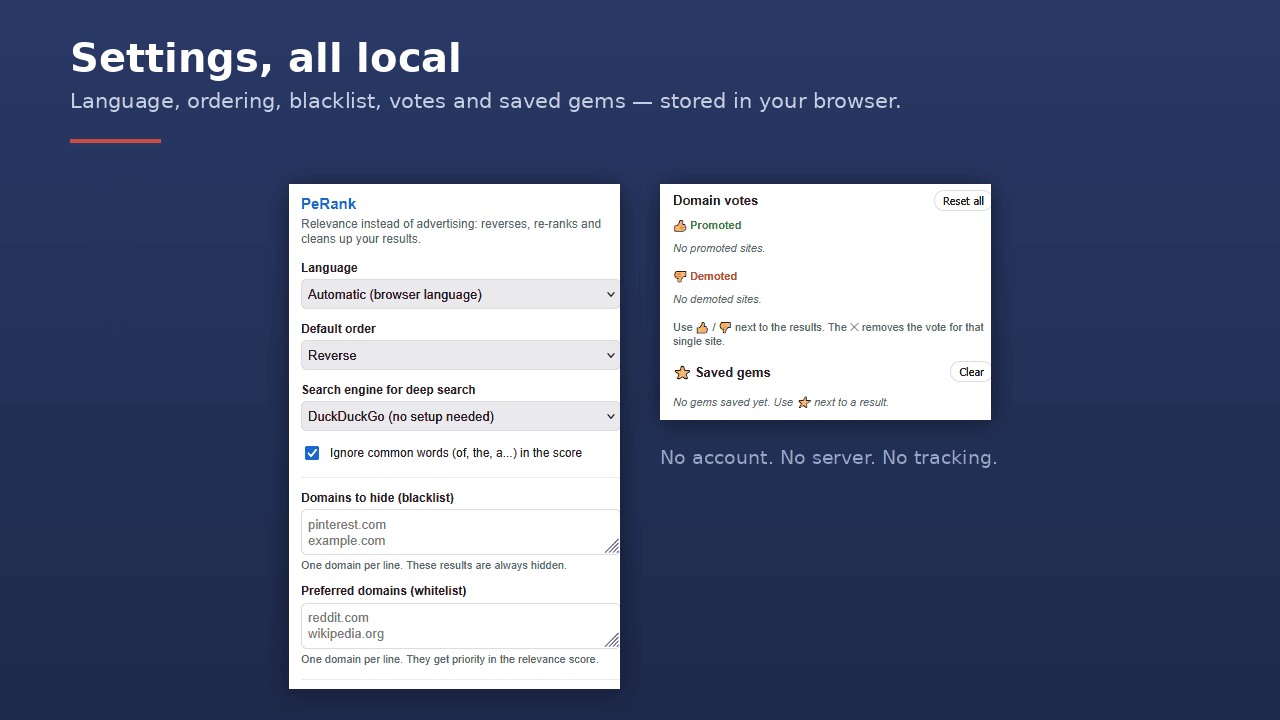
PeRank reverses and re-ranks the
results of eight search engines, hides sponsored ones and helps you dig
past the first page — where the genuinely useful pages often are.

Eight engines, and an honest note

Reversing, relevance re-ranking and ad removal work on all eight
supported engines: Google, Bing, DuckDuckGo, Startpage, Yandex, Brave,
Ecosia, Yahoo. Deep search — going beyond page one — depends on what
each engine actually allows:

The first page is not the best page

Search engines put sponsored results and heavily
SEO-optimised pages at the top. What ranks first is often what is best
at ranking — not what best answers your question. The honest review, the
forum thread with the real test, the personal blog with hands-on
experience: those tend to sit on page five, or ten.

PeRank does not replace the search engine. It
works on the results you already have in front of you, and lets you look
at them the other way around.

Read Full Article (Italian)

Visit Homepage (switch to English)

Repo Github (English)

perank
Chat Control 2.0: Il 29 Settembre si discute se ampliare il monitoraggio anche in presenza della crittografia End to End

Chat Control 2.0: Il 29 Settembre si discute se ampliare il monitoraggio anche in presenza della crittografia End to End

1 min read

An Italian lang article to get the timeline of Chat Control in EU not simple a news but a chance to prevent all scenarios.

Nel trilogo* del 29 settembre 2026
dovrebbe essere esaminata anche la questione dell’eventuale applicazione
delle misure di rilevamento alle comunicazioni protette da crittografia
end-to-end. Non è una votazione autonoma sul ‘sì’ o sul ‘no’ alla
scansione cifrata, ma un negoziato sul testo complessivo del regolamento
europeo CSAR, noto informalmente come Chat Control 2.0. E’ il sesto
trilogo politico e il primo sotto la presidenza irlandese del Consiglio.
Storicamente, l’Irlanda si è schierata con il blocco favorevole alla
scansione, quindi ci si aspetta una spinta più decisa da parte del
Consiglio.

*Per trilogo si intende la riunione
informale e spesso a porte chiuse tra rappresentanti di Parlamento
Europeo, Consiglio dell’UE e Commissione Europea, definito come incontro
interistituzionale

Leggi tutto

EU
Check out today's best deals on Amazon
amazon /c/amazon

Check out today's best deals on Amazon

Discover great savings on products you might need. When you purchase through these links, OddsRabbit earns a small commission at no extra cost to you - helping keep the platform running. You might even find an amazing deal on something you were looking for.

DeskStamp — a folder for every day, so your Desktop stops being a junk drawer

DeskStamp — a folder for every day, so your Desktop stops being a junk drawer

2 min read

We've all done it: something lands on the Desktop "just for a second" to deal with later, and six months later it's still there, buried under forty other things you also meant to deal with later. DeskStamp tackles this with an almost embarrassingly simple idea — the first time you save something to your Desktop today, it creates a dated folder for today, and everything you save from that point on goes straight into it.

No fixed delay, no batch cleanup at the end of the day: items move in as soon as they're ready. It's careful about what it leaves alone, too — shortcuts, anything that was already sitting on your Desktop before it started running, and anything you've explicitly excluded all stay untouched. And if you pull something back out of a day's folder onto the Desktop, DeskStamp won't touch it again.

The payoff is the part that actually matters: instead of hunting file by file when your Desktop gets messy, you get a clean history organized by day — and when a day's folder is no longer useful, you delete the whole thing in one go instead of picking through it piece by piece.

It runs quietly from the notification area, can start with Windows, and — like the others — asks nothing of you in return: no account, no cloud, everything stays local.

Full article (Italian) — the app itself and the GitHub repo are in English: https://tivustream.com/deskstamp-ogni-giornata-ha-la-sua-cartella-sul-desktop-gratuito-open-source-100-locale/

How it works 
FilesGoThere — the little watchdog that keeps your Downloads folder from turning into chaos

FilesGoThere — the little watchdog that keeps your Downloads folder from turning into chaos

2 min read

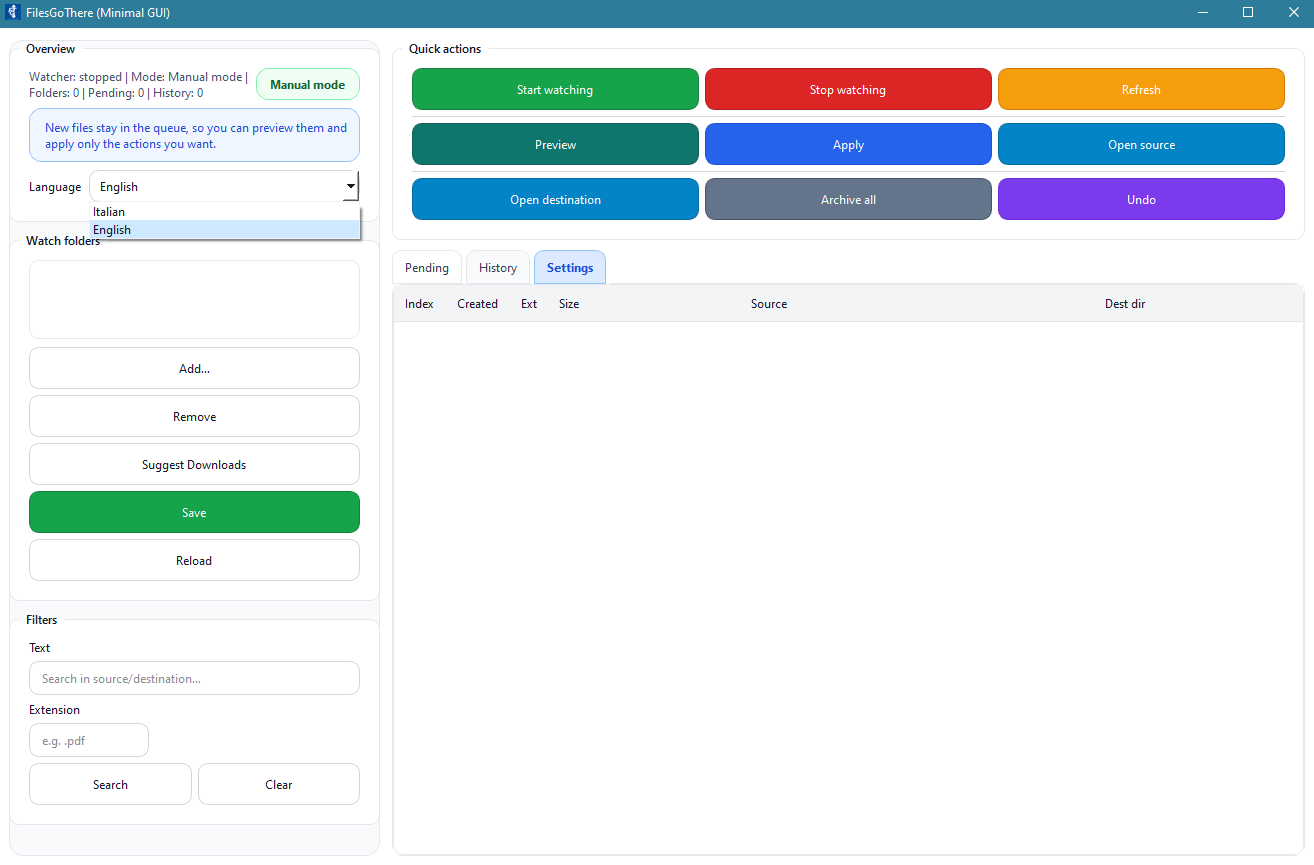
If your Downloads folder looks like a digital junk drawer, this one's for you. FilesGoThere is a Python app that sits quietly in your system tray, watches the folders you tell it to (your Downloads, a specific drive, wherever your browser dumps files), and automatically sorts new files into the right place the moment they land.

It's built to just work in the background: launch with Windows, pop to the foreground when it starts or when a download finishes, then get out of your way and back into the tray. You can run it fully hands-off in "move immediately" mode, or review things first if you'd rather keep a human in the loop.

Under the hood it's had real attention to the annoying edge cases that make or break a tool like this: it won't touch a file mid-download (no more half-written files getting grabbed too early), it keeps a history you can clean up without ever touching the actual files on disk, and it supports selecting multiple entries at once when you need to fix something in bulk.

Like everything else here, it's free, open source, and asks nothing of you — no account, no cloud, nothing phoning home. It just organizes your files and stays out of your way.

Full article (Italian) — the app itself and the GitHub repo are in English: https://tivustream.com/filesgothere-il-software-open-source-che-mette-in-ordine-i-tuoi-download-gratuito-offline-e-privacy-first/

Home Soft